Unlock the secrets of Roblox DataStores and learn how to save player data effectively. This comprehensive guide covers everything from basic setup to advanced techniques, ensuring your game remembers player progress, items, and settings. Discover best practices for robust data management, avoid common pitfalls, and enhance your game's persistence, making it more engaging and replayable for your audience. We'll explore asynchronous saving, error handling, and security considerations, providing a solid foundation for any aspiring Roblox developer. Master player data management and elevate your Roblox creations today with our expert insights.
Hey there, fellow Roblox developer! Ever scratched your head wondering how to make your game truly remember your players, from their epic gear to their hard-earned progress? You're not alone! DataStores are the unsung heroes behind persistent worlds on Roblox, allowing your creations to grow and evolve with every player's journey. This ultimate living FAQ is constantly updated for the latest patches and best practices, aiming to demystify DataStores and equip you with the knowledge to build incredibly engaging and memorable games. We'll cover everything from the absolute basics to advanced techniques, ensuring your game always remembers what matters most.
Most Asked Questions about How to Use DataStore Roblox
What is the most basic script for saving and loading player data using DataStores?
To start, use `DataStoreService:GetDataStore("MyDataStore")` to define your store. For saving, use `DataStore:SetAsync(player.UserId, data)` wrapped in a `pcall`. Loading involves `DataStore:GetAsync(player.UserId)`, also within `pcall` to handle errors. This ensures basic player progress like coins or scores are remembered across sessions efficiently and reliably. Remember to get the data when the player joins and save it when they leave.
How do I prevent data loss or corruption in Roblox DataStores?
Preventing data loss is crucial. Always wrap DataStore calls in a `pcall` to catch errors gracefully. Implement `UpdateAsync` for modifying existing data, as it handles concurrent writes better than `SetAsync`. Avoid saving too frequently to prevent hitting rate limits, which can cause failed writes. Periodically auto-save player data, not just on player leave, to minimize progress loss from unexpected server shutdowns. Backup strategies also help.
What are the common errors or bugs when implementing DataStores and how to fix them?
Common errors include `pcall` not being used, leading to script crashes. Fix by always enclosing `SetAsync` or `GetAsync` within `pcall`. Incorrect DataStore names or keys can cause data to not be found; double-check consistency. Exceeding rate limits results in throttling; implement retries with exponential backoff. Saving non-serializable data (like Roblox objects) will fail; convert them to basic types first. Debug with print statements to trace data flow.
What is the optimal way to save complex player inventory data in a DataStore?
For complex inventories, store all player items within a single Lua table, then save that entire table to one DataStore key (using the player's UserId). Represent each item as a nested table with properties like `Name`, `Quantity`, `ID`, etc. Use `UpdateAsync` to modify and save this main inventory table, ensuring atomicity. This minimizes DataStore calls and simplifies data management. Always validate inventory changes on the server.
How can I implement a global leaderboard using DataStores effectively?
To create a global leaderboard, use `DataStoreService:GetOrderedDataStore("LeaderboardName")`. Update player scores using `OrderedDataStore:SetAsync(player.UserId, score)`. For display, fetch sorted data using `GetSortedAsync`. To avoid rate limits on frequent display, cache the top scores on a server and update it periodically, then have clients request the cached data. This provides a dynamic, high-performance leaderboard. Always update only when scores change.
Tips: Best practices for securing DataStores against exploits?
Secure DataStores by performing all write operations on the server-side (`Script`), never directly from a client (`LocalScript`). Validate all client requests before making DataStore changes; for instance, check if a player truly owns an item before selling it. Ensure currency deductions or item grants are done server-side after successful validation. This prevents exploiters from manipulating their saved data or bypassing game logic.
Trick: How to handle older player data structures when updating my game?
When updating your game, you can gracefully handle older player data by implementing versioning. Include a `Version` field in your saved player data table. When data is loaded, check its version. If it's an older version, write migration logic to update the data structure on the fly, adding default values for new fields or reformatting old ones. Then save the updated data. This ensures backward compatibility without losing player progress.
Guide: What are DataStore limits and how to manage them?
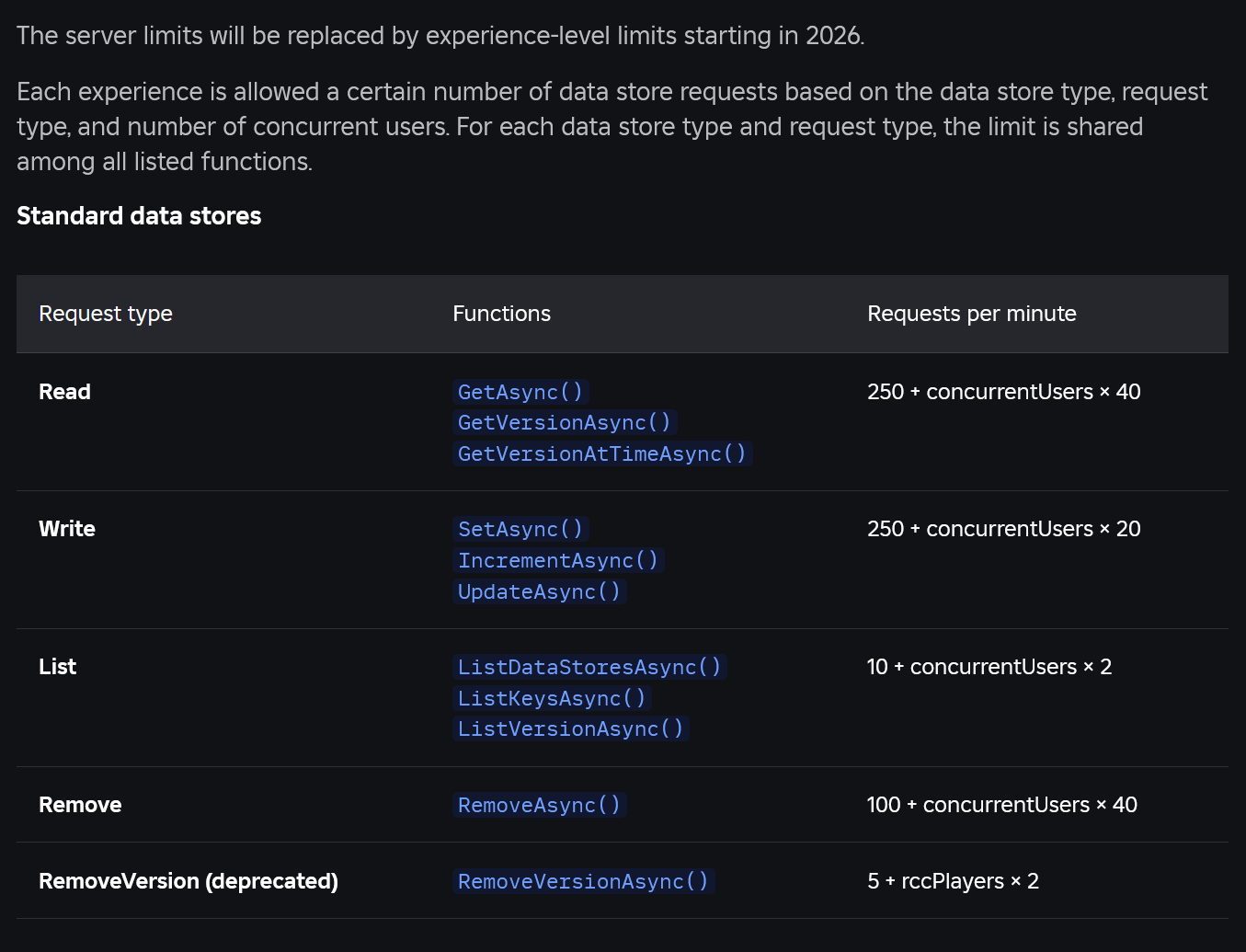
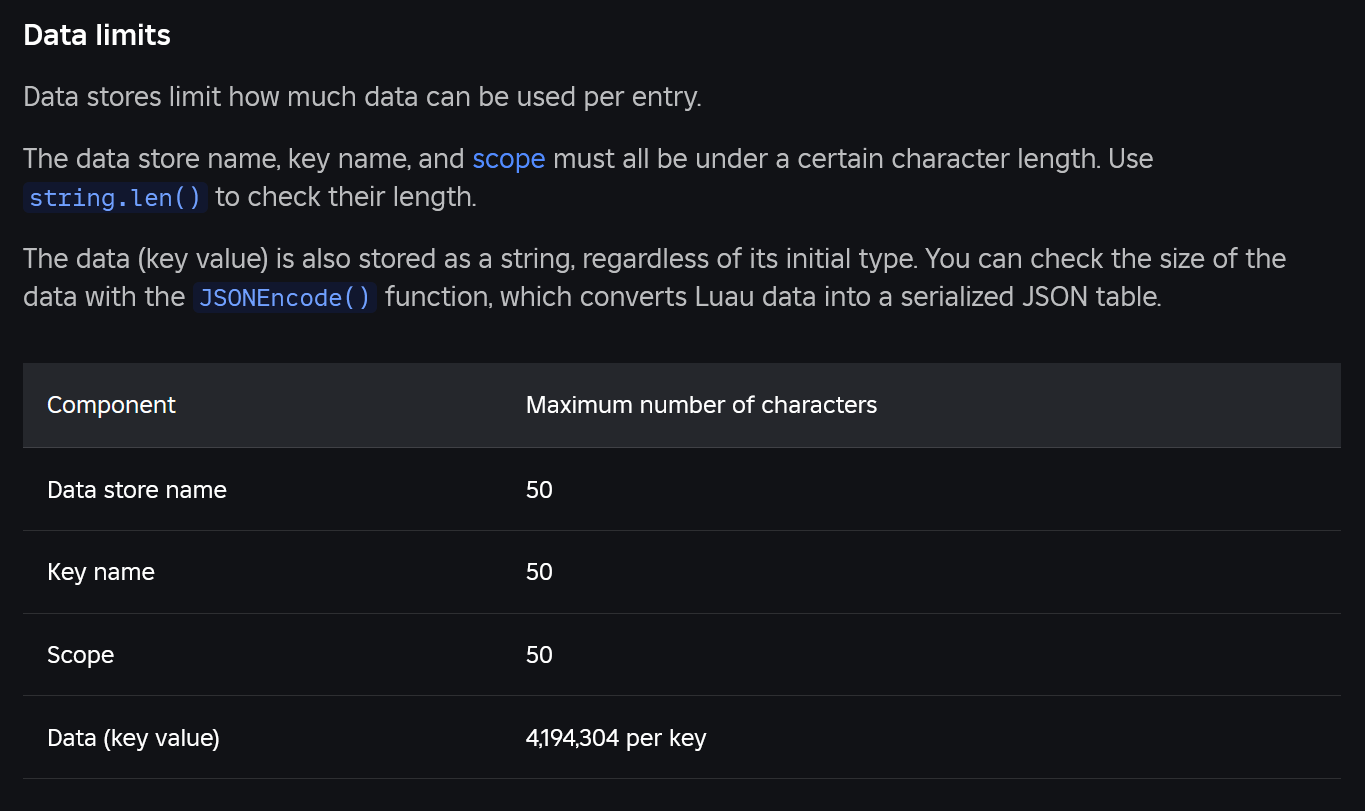
Roblox DataStores have rate limits per game and per key to prevent abuse. `SetAsync`, `GetAsync`, and `UpdateAsync` have specific call limits. Manage these by: 1) Batching operations: save all player data in one go. 2) Infrequent saving: only save when necessary (player leaves, significant progress, periodic auto-save). 3) Exponential backoff: retry failed requests after increasing intervals. 4) Use `UpdateAsync` for concurrent writes, as it's more efficient than `SetAsync` for this. Monitor your `pcall` error messages for rate limit warnings.
Still have questions?
If you're still pondering the intricacies of DataStores, don't sweat it! The Roblox Developer Hub is an incredible resource with in-depth articles and examples. You might also find answers in our guides on advanced scripting techniques or optimizing game performance. Happy developing, and keep building those amazing Roblox worlds!
Ever wondered how popular Roblox games manage to remember your progress, your cool items, or even your custom settings between play sessions? It's all thanks to something called a DataStore! If you've been asking yourself, "How do I use DataStores in Roblox to save my game's player data effectively?" you're in the right place. We're diving deep into the world of persistent data, ensuring your game remembers everything important. This isn't just about technical jargon; it's about making your creations truly engaging and sticky for players, keeping them coming back for more.
Understanding **Roblox game persistence** is crucial for user engagement in Roblox experiences. This mechanism ensures that player progress, collected items, and personalized settings are all saved across multiple gaming sessions, significantly enhancing the overall user experience. Without game persistence, every single game would feel like starting from scratch each time, which can quickly become incredibly frustrating for players and lead to them abandoning your game. It's the backbone of any compelling, long-term player experience on the platform, fostering a sense of progression and ownership.
Implementing **DataStore API best practices** is essential for developers to avoid common pitfalls like data loss or throttling. Following established guidelines such as wrapping data operations in pcall for robust error handling, batching multiple data requests when possible, and diligently managing API request limits is paramount for creating a reliable data saving system. Adhering to these practices helps prevent frustrating issues for both the players, who risk losing their hard-earned progress, and the developers, who could face unexpected errors and data corruption. Proper implementation ensures data integrity and a smooth user experience, which is exactly what we're aiming for.
The concept of **asynchronous data saving** is absolutely vital for maintaining smooth gameplay in Roblox. Asynchronous operations allow the game to continue running fluidly without freezing or lagging while data is being saved to or loaded from Roblox's remote servers. This non-blocking approach ensures a seamless and responsive player experience, which is critically important for player retention and overall game enjoyment. Imagine your game freezing for several seconds every time a player picks up an item or changes a setting—that's a surefire way to lose players. Asynchronous saving eliminates these interruptions.
Efficient **player data management** within Roblox games benefits both players and developers significantly. Players enjoy the consistency of their progress, knowing their efforts are always saved and accessible. Developers, on the other hand, gain powerful tools to personalize experiences, accurately track player advancements, and even implement complex features such as dynamic leaderboards, intricate inventory systems, or even player-specific customizations. This organized approach to data not only improves the player's journey but also empowers developers to build more sophisticated and compelling virtual worlds. It truly transforms a simple game into a persistent, evolving experience.
For any aspiring Roblox developer asking, "Where can a beginner Roblox developer find a comprehensive tutorial on implementing DataStores effectively?" the answer is a goldmine of resources. The official **Roblox Developer Hub** is an invaluable starting point, offering detailed documentation and step-by-step guides suitable for all skill levels. Beyond that, many talented creators on **YouTube** publish excellent video tutorials, breaking down complex concepts into digestible segments. Additionally, active Roblox community forums and Discord servers are fantastic places to ask questions and learn from experienced developers. These diverse resources collectively provide a robust learning pathway for quickly grasping the essentials of DataStore implementation and beyond, empowering new developers to bring their persistent game ideas to life.
Beginner / Core Concepts
So, you're ready to dive into the world of saving player data in Roblox, huh? It's a game-changer, literally! Don't worry if it seems a bit overwhelming at first; we're going to break it down piece by piece. Think of DataStores as your game's memory, allowing it to remember things even after a player leaves. It's how games keep track of your coins, your high scores, and all your cool gear. Let's get started on the fundamentals, and I promise you'll be saving data like a pro in no time.
- Q: What exactly is a DataStore in Roblox and why is it so important for my game?
- Q: How do I get started with a simple DataStore to save basic player data like points?
- Q: What are the common types of data I can save using DataStores and are there any limitations?
- Q: Why do developers always talk about 'pcall' when using DataStores? What is it?
A: A DataStore in Roblox is essentially a cloud-based storage system that allows your game to save and load persistent data for individual players or even global game states. Imagine it as a secure digital locker for each player's information. It's incredibly important because it lets your game remember things like a player's progress, their inventory of items, their currency balance, or any settings they've customized, even after they've left the game and come back later. This persistence is what makes games truly engaging; players invest time and effort knowing their progress won't be lost. Without DataStores, every game session would feel like starting from scratch, which quickly disincentivizes long-term play. It's the secret sauce for player retention and building a thriving game world. You've got this!
A: To kick things off with a simple DataStore, you'll first need to get a reference to the DataStore Service. You can do this by using game:GetService("DataStoreService"). Once you have the service, you'll need to create a specific DataStore using DataStoreService:GetDataStore("MyPlayerDataStore"), giving it a unique name for your game. For saving basic player data like points, you'll typically use a key that uniquely identifies each player, which is usually their UserId. When a player joins, you'd load their points, and when they leave or earn more points, you'd save it back. Always remember to wrap your save and load calls in a pcall (protected call) to handle potential errors gracefully, like if the server goes down temporarily. It’s a bit like putting a safety net under your data operations. Try setting up a simple point system to practice saving and loading; you'll be surprised how quickly it clicks. Keep experimenting!
A: You can save a wide variety of data types using DataStores, making them super versatile for your game development needs. Commonly, developers store numbers (like currency, scores, levels), strings (for player names or messages), booleans (for achievements or toggle settings), and especially tables. Tables are fantastic because they allow you to store complex structures, like a player's entire inventory, including item names, quantities, and properties. You can even nest tables within tables to create highly organized data. However, there are some limitations you should be aware of. Data values must be under 256 kilobytes in size, which is quite generous for most player data but something to keep in mind for extremely complex systems. Additionally, you can't save Roblox objects directly; you'll need to serialize their relevant properties into basic data types like strings or numbers. This one used to trip me up too, but once you get the hang of it, you'll find DataStores incredibly powerful. You're doing great!
A: Ah, pcall, the unsung hero of reliable data saving! I get why this confuses so many people, especially when you're just starting. Essentially, pcall stands for "protected call," and it's a Lua function that allows you to safely execute another function without completely crashing your script if an error occurs during its execution. When you're dealing with DataStores, you're communicating with external Roblox servers, and sometimes things can go wrong: the network might be unstable, the DataStore service could be temporarily unavailable, or you might hit rate limits. If you don't use pcall, any of these errors could stop your entire script or game cold! By wrapping your DataStore calls in pcall, you're telling your script, "Hey, try this, but if it fails, just tell me what went wrong instead of breaking everything." It returns two values: a boolean indicating success or failure, and then either the result of the function or an error message. It's your safety net for data operations, ensuring your game remains stable even when the unexpected happens. Seriously, always use pcall! You'll thank yourself later!
Intermediate / Practical & Production
Alright, you've got the basics down, which is awesome! Now, let's talk about taking your DataStore game to the next level. This is where we start thinking about efficiency, scalability, and handling real-world scenarios in a live game. We'll explore how to manage multiple types of data, deal with concurrent saves, and keep your game running smoothly without hitting those pesky Roblox API limits. These are the practical considerations that separate a good game from a great one, ensuring your players have a seamless experience. Get ready to refine your DataStore skills!
- Q: How can I efficiently save multiple pieces of player data (like currency, inventory, and stats) at once using a single DataStore?
- Q: What are DataStore throttling and rate limits, and how do I avoid them in my game?
- Q: How do I handle new data fields or changes to my saved data structure in an existing game without losing old player data?
- Q: What's the difference between `GetDataStore` and `GetOrderedDataStore`, and when should I use each?
- Q: How can I debug DataStore issues when data isn't saving or loading correctly in my Roblox game?
- Q: What are the security considerations I need to keep in mind when working with DataStores in Roblox?
A: To efficiently save multiple pieces of player data, the best approach is to store all related data for a single player within one large table and then save that table to a single DataStore key. This is often referred to as a "player data table." Instead of having separate DataStores for "Coins," "Inventory," and "Stats," you'd have one DataStore, say "PlayerDataStore," and each player's key (their UserId) would map to a table containing all their information. For example, {Coins = 100, Inventory = {"Sword", "Shield"}, Stats = {Strength = 10, Agility = 5}}. This method reduces the number of calls to the DataStore service, making your operations more efficient and less likely to hit rate limits. When loading, you load the entire table; when saving, you save the entire updated table. Remember to handle nil values if a player's data isn't found yet, initializing a new table for them. It streamlines everything beautifully. Give it a shot; it simplifies your code quite a bit!
A: DataStore throttling and rate limits are Roblox's way of ensuring fair usage of their servers and preventing a single game from monopolizing resources. Essentially, there's a limit to how many DataStore requests (saves, loads, updates) your game can make within a certain timeframe. If you exceed these limits, your requests will be throttled, meaning they'll either be delayed or outright fail, which can lead to data loss or a poor player experience. To avoid them, you should implement several strategies: first, **batch your save operations** as much as possible, as mentioned before, saving a single, comprehensive player data table rather than many small pieces. Second, **don't save data too frequently**; only save when truly necessary, such as when a player leaves, completes a significant action, or at regular, infrequent intervals (e.g., every 60 seconds). Third, consider using `OrderedDataStores` for leaderboards, which have different rate limits and are optimized for that specific use case. Finally, **implement retries with exponential backoff** within your `pcall` handling for failed requests. This means if a save fails, you wait a short period and try again, increasing the wait time with each subsequent failure. This dramatically improves reliability without hammering the servers. It's all about being a good neighbor on the Roblox platform! You're learning the pro moves now.
A: Handling schema changes in live games is a super common challenge, and it's something every developer faces. The key is to implement **data versioning** and **migration logic**. When you load a player's data, first check its structure or a dedicated 'version' field you've added. If the loaded data is from an older version or is missing new fields, your script should then 'migrate' it. This means you'll add any new default values for missing fields to the loaded table, or perhaps restructure old data into the new format. For example, if you add a new 'Pets' field, when old data loads without it, you'd simply set playerData.Pets = {}. This ensures backward compatibility. Never assume old data will perfectly match your new structure. It's a bit like updating an app on your phone; it needs to know how to handle your old settings. This careful approach prevents players from losing their valuable progress just because you updated your game. Planning for this from the start will save you a huge headache down the road!
A: This is a great question, and understanding the distinction is crucial for optimizing your data management. GetDataStore, which we've been primarily discussing, is your general-purpose DataStore. It's used for saving arbitrary data associated with unique keys, typically player IDs. You'd use this for things like a player's inventory, stats, settings, or any other personalized, unstructured data. The order of keys is not guaranteed, and you mostly interact with individual key-value pairs. GetOrderedDataStore, on the other hand, is specifically designed for saving numeric values that need to be ranked, like leaderboards. It stores a key (usually a UserId) and a numeric value, and its primary feature is the ability to retrieve entries in ascending or descending order based on those numeric values. You'd use an OrderedDataStore when you want to create a global leaderboard for scores, coins, or playtime, where the ranking of players is important. You wouldn't use it for saving an entire inventory. So, if you just need to save general stuff, `GetDataStore` is your buddy. If you need to rank players by a score, `GetOrderedDataStore` is the way to go. Each has its specialized role, making your development process more efficient! Keep up the good work!
A: Debugging DataStore issues can feel like finding a needle in a haystack, but with the right approach, you can pinpoint problems quickly. First, the most common culprit is a missing or improperly handled `pcall`. Always check that your save and load operations are wrapped in `pcall` and that you're inspecting the `success` boolean and `errorMessage` string it returns. Print these to the output! Second, verify your DataStore names are consistent; a typo can cause your script to access a different, empty DataStore. Third, ensure the data you're attempting to save is compatible (remember, no Roblox objects directly). Fourth, check for rate limit errors; if you're saving too often, Roblox will block requests. Implement retries. Fifth, use `print()` statements generously around your DataStore calls to trace the flow of data and see exactly what's being attempted and what's being returned. Finally, test loading and saving in various scenarios, including leaving the game quickly, joining immediately after leaving, and even with different accounts. The Roblox Developer Hub and community forums are also fantastic places to search for specific error messages. Don't get discouraged; persistence is key in debugging! You'll get there!
A: Security is paramount when dealing with player data, and I'm glad you're thinking about it! The most critical rule is this: **never trust the client!** All DataStore operations (saving, loading, updating) must be performed on the server-side, typically within a `Script` in `ServerScriptService`. If you allow client-side scripts (LocalScripts) to directly interact with DataStores, players could easily manipulate their own data, giving themselves unlimited currency or items, which breaks the game for everyone. Clients can send requests to the server, but the server must validate those requests before performing any data modification. For example, if a player tries to buy an item, the client asks the server, and the server then checks if the player has enough currency *before* deducting it from their DataStore value and giving them the item. Always assume any information coming from a client could be malicious or incorrect. Implementing server-side validation and only allowing the server to touch DataStores keeps your game fair and secure. You're building a robust system!
Advanced / Research & Frontier
Okay, you're not just saving data; you're thinking about the future, about scale, and about truly robust systems. This is where we delve into more sophisticated DataStore patterns, error recovery, and even considerations for complex game economies. We're talking about making your data system not just functional, but resilient and future-proof. These concepts might seem a bit more involved, but mastering them will set your game apart and give you incredible flexibility. Let's push the boundaries of what your DataStores can do!
- Q: How can I implement a robust data recovery system to prevent data loss due to server crashes or unexpected shutdowns?
- Q: What is GlobalDataStore and how does it differ from a standard DataStore, and when would I use it?
- Q: How can I use DataStores to create a global leaderboard that updates frequently without hitting rate limits?
- Q: What are the considerations for implementing a robust trading system or in-game economy that relies on DataStores?
- Q: How does `UpdateAsync` work and why is it generally preferred over `SetAsync` for modifying existing player data?
A: Implementing a robust data recovery system is crucial for a professional-grade Roblox game. While `pcall` handles immediate errors, true recovery goes deeper. A common advanced strategy is to use **periodic auto-saves combined with player-leave saves**. This means you save player data every X minutes (e.g., 5-10 minutes) in addition to saving when they explicitly leave. If a server crashes, the player loses progress only up to the last auto-save, not everything since they joined. For more critical data, consider a **double-write pattern** or **"shadow data"**. This involves saving a copy of the player's data to a secondary, less frequently accessed DataStore, or saving a snapshot of their data *before* a major transaction (like an expensive purchase). If the primary save fails after a critical event, you might have a recent backup to fall back on or audit. You could also log critical events (like transactions) to an external logging service (via `HttpService` to a custom backend) for auditing purposes. While Roblox handles much of the underlying infrastructure, these developer-side strategies add extra layers of protection against the inevitable unpredictable events that can occur in any live service. It’s all about minimizing the blast radius of any potential issue. You're thinking like a pro now!
A: GlobalDataStore, often simply referred to as a standard DataStore, is what we've primarily been discussing when we talk about `GetDataStore`. It's the primary mechanism for saving and loading data associated with specific keys, which are most commonly player UserIds. It allows you to store unique data sets for each player, ensuring their personal progress remains distinct. The term "GlobalDataStore" is sometimes used interchangeably with DataStore to emphasize its global availability across all servers of your game, as opposed to a temporary, server-specific storage. You'd use this for almost all player-specific persistent data, such as inventories, currencies, experience points, or custom settings. There isn't a separate API for `GlobalDataStore` versus `GetDataStore`; they are one and the same in practice. The key distinction often comes when comparing `GetDataStore` to `GetOrderedDataStore`, as `GetOrderedDataStore` is specialized for ranked numerical data. So, if you're saving anything that isn't primarily for a leaderboard, `GetDataStore` (or `GlobalDataStore` as it might be referred to) is your go-to. Keep these terms clear in your mind; it helps a lot!
A: Creating a global leaderboard that updates frequently without hitting rate limits is a fantastic challenge, and `OrderedDataStore` is your primary tool. Since `OrderedDataStore`s are designed for this, they have more forgiving rate limits for `GetSortedAsync`. However, you still need smart strategies. First, only update a player's score in the `OrderedDataStore` when their score *actually changes* significantly, or when they leave the game. Don't update it every second. Second, when displaying the leaderboard, you typically don't fetch the entire thing every time a player looks at it. Instead, **cache the leaderboard data**. Have a single server (or even a dedicated script) periodically fetch the top X entries from the `OrderedDataStore` (e.g., every 30-60 seconds) and store it in a server-side variable. Other servers or clients can then request this cached data, which eliminates redundant `GetSortedAsync` calls. You might use `MessagingService` to broadcast updates to all servers when the cache refreshes. For even higher performance, consider using a `MemoryStoreService` cache in front of your `OrderedDataStore` for rapid access. It’s a multi-layered approach to ensure smooth, real-time-ish leaderboards. You're thinking big now, I like it!
A: Building a trading system or in-game economy on DataStores introduces significant complexity, primarily around **transaction integrity** and **prevention of item duplication or currency exploits**. The paramount rule here is **atomicity**: a transaction (like trading an item or buying something) must either fully complete or fully fail, never leaving data in an inconsistent state. This means using `UpdateAsync` rather than `SetAsync` for critical operations that modify existing data. `UpdateAsync` provides an optimistic locking mechanism, ensuring that if multiple servers try to update the same data concurrently, only one will succeed, and the others will get the most recent version to re-attempt their update. For a trading system between two players, you'd need to update both players' data within a single, atomic operation or ensure careful rollback if any part fails. You must also validate *everything* on the server-side, verifying item ownership, currency amounts, and trade legitimacy. Logging all critical transactions is also a must for auditing and identifying exploits. This is where DataStores meet real-world financial principles, and careful design is essential. You're tackling some serious challenges, and that's awesome!
A: This is a fantastic question that gets to the heart of robust data management. While `SetAsync` directly writes a new value to a DataStore key, `UpdateAsync` is generally preferred for *modifying existing data* because it provides **optimistic locking** and helps prevent concurrent overwrite issues. Here's how it works: you provide `UpdateAsync` with a function. Roblox fetches the *latest value* stored under that key, then passes that value into your provided function. Your function then takes this current value, makes its modifications (e.g., adds coins, removes an item), and returns the *new, updated value*. Roblox then attempts to save this new value. The magic happens if another server simultaneously tries to update the same key. If that happens, Roblox detects the conflict and re-runs your update function with the *very latest* value, ensuring your changes are applied correctly to the most up-to-date data. This prevents a common problem where two servers might load the same data, both make changes, and then `SetAsync` only one of them, overwriting the other's changes. `UpdateAsync` ensures your updates are always based on the most current data, making your game's data integrity much stronger, especially in multiplayer environments. It's a lifesaver for complex economies! You're really digging into the advanced stuff, and that's fantastic!
Quick Human-Friendly Cheat-Sheet for This Topic
- Always use `pcall` for DataStore operations: It's your safety net against errors and prevents your game from crashing.
- Store all a player's data in one big table: This reduces DataStore calls and keeps things organized and efficient.
- Don't save too often: Only save when necessary, like on player exit or every few minutes, to avoid rate limits.
- Use `UpdateAsync` for modifying existing data: It safely handles concurrent saves and prevents data loss in multiplayer.
- Never trust the client: All DataStore operations must happen on the server to prevent cheating and exploits.
- Plan for data changes: Design your data with versioning in mind so you can add new fields later without breaking old player saves.
- Test thoroughly: Test loading and saving in different scenarios, including quick exits and rejoin, to catch subtle bugs.
Master Roblox DataStores for game persistence, learn asynchronous saving techniques, implement robust error handling, understand security best practices, save player progress and items, optimize data for performance, utilize the DataStore API efficiently, troubleshoot common data saving issues.
35


Roblox Data Store System By Captain Script KQOOgI . GitHub Ryand2nd ROBLOX DATASTORE Roblox Leaderstats DataStore ROBLOX DATASTORE. SOLVED Datastore Question Scripting Support Developer Forum Roblox . DataStores For Dummies Community Tutorials Developer Forum Roblox 2 1024x735 . Datastore For Simple Game Platform Usage Support Developer Forum



Listing Items From A DataStore Scripting Support Developer Forum . Question On Data Store Usage And Storage Platform Usage Support 2 668x500 . How Can I Store These In The Datastore Scripting Support Developer . How Can I Store These In The Datastore Scripting Support Developer . DataStores Access And Storage Updates Developer Forum 2 1024x356


How To Make A Good Datastore Script Scripting Support Developer . Datastore Tutorial For Beginners Community Tutorials Developer 2 1380x776 . Datastore Tutorial For Beginners Community Tutorials Developer 2 1035x582 . Datastore Tutorial For Beginners Community Tutorials Developer 2 1380x776 . DataStores Beginners To Advanced Community Tutorials Developer


How To Use DataStore2 Data Store Caching And Data Loss Prevention . How To Make A Simple Data Store Community Resources Developer . Reading And Adding To Datastore Without Pulling Everything Scripting . How Do Datastores Compress Data Scripting Support Developer Forum . How Do Datastores Compress Data Scripting Support Developer Forum

How To Loop Through All Datastores Access The Data Scripting . How To Loop Through All Datastores Access The Data Scripting . Datastore Is Not Saving My Data Scripting Support Developer Forum . Datastore Tutorial For Beginners Community Tutorials Developer . How Can I Make A Datastore For This Script Scripting Support




How To Use DataStore2 Data Store Caching And Data Loss Prevention . Can T Figure Out How To Get My Datastore To Work Scripting Support 2 1024x239 . Data Store Limit In Saving Voxel Terrain Game Design Support . Powerful Updates For Data Stores Dashboard 2 690x311 . Powerful Updates For Data Stores Dashboard 2 1035x76


Powerful Updates For Data Stores Dashboard . Roblox Studio Datastore H Ng D N Ng D Ng V Gi I Ph P Ph T Tri N . Advanced Datastore Tutorial Roblox Studio YouTube . Roblox Studio Datastore Tutorial NexoBeats YouTube . Best Roblox Datastore Plugin YouTube